Three bank statements arrived this morning from the same client. One was a clean digital PDF from Chase. One was a scanned, slightly skewed document from a regional credit union. The third was a password-protected file from HSBC with transactions running across 47 pages.
All three contain the information needed to update the books. None of them are ready to enter accounting software.
The gap between receiving a bank statement PDF and having usable transaction data inside QuickBooks or Xero is where most of the real work lives. That gap is bank statement processing, and it’s a multi-stage workflow, not a single conversion step. A PDF must become structured, verified, categorized, and reviewed data before it’s ready for the accounting workflow.
By the end of this piece, you’ll understand exactly what happens at each stage of that workflow, where errors creep in, and where professional judgment still matters more than automation.
What is bank statement processing?
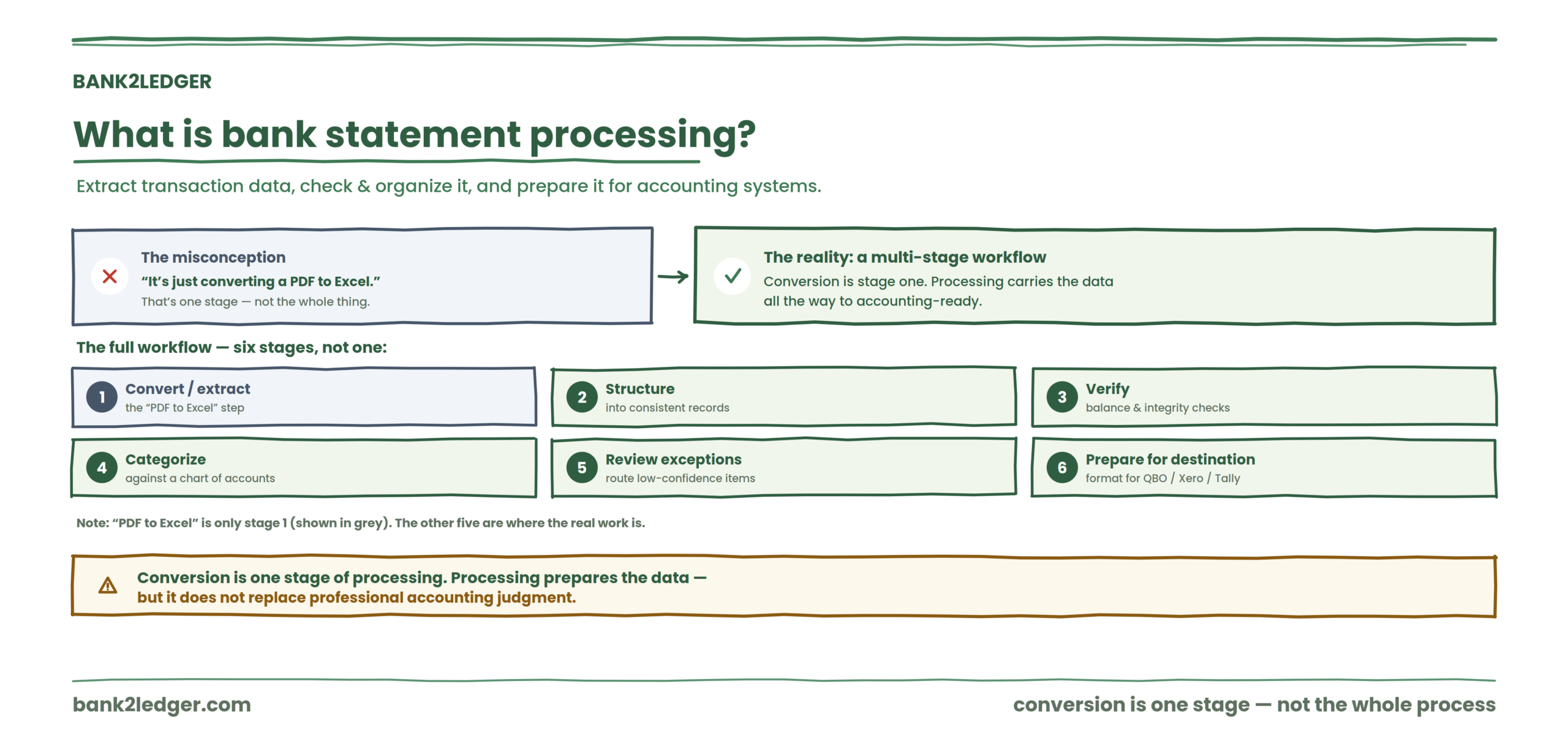
Bank statement processing is the workflow of extracting transaction information from bank statements, checking and organizing that data, and preparing it for accounting or financial systems.
That definition matters because most people treat it as a synonym for “converting a PDF to Excel.” It isn’t. PDF conversion is one stage. Processing includes structuring raw data into consistent records, verifying that the extracted information is mathematically reliable, categorizing transactions against a chart of accounts, reviewing exceptions, and preparing the output for a specific destination system.
Bank statement conversion is one stage of bank statement processing. Processing prepares data for accounting, but it does not replace professional accounting judgment.
Why a bank statement PDF can’t go straight into the books
A bank statement is designed for a human reader. Accounting software needs structured transaction data. Those are fundamentally different things.
Consider what a typical statement contains: running balances that reset across pages, multi-line transaction descriptions, debit and credit columns that vary by bank, headers and footers repeating on every page, and sometimes scanned images where the text isn’t even machine-readable yet.
QuickBooks doesn’t know what to do with that. Neither does Xero, Tally, or Sage. They need clean rows: date, description, amount, transaction type. A preparation layer sits between the raw document and the accounting system, and skipping it is how errors get posted.
If you’re looking for the mechanical steps of getting a PDF into your software, the guide on how to convert bank statement PDFs into accounting software covers that path directly.
The six stages of bank statement processing
This is the framework that separates actual processing from simple file conversion. Each stage does something distinct, and confusing them is where workflows break down.
→
2 Structure
→
3 Verify
→
4 Categorize
→
5 Review
→
6 Prepare
Stage 1: extract the transaction data
The system reads the bank statement and identifies transaction information inside it: dates, descriptions, amounts, balances.
For digital PDFs, this is relatively straightforward because the text layer already exists. For scanned statements, OCR handles the recognition, and scan quality matters enormously. One vendor study found that pre-processing steps like de-skewing and contrast enhancement can improve OCR accuracy by 15 to 20 percent. That’s the difference between a usable output and an afternoon of corrections.
Layout detection identifies where transaction rows, headers, and totals sit on each page. Different banks use different layouts, so a system that works perfectly on a Barclays statement might stumble on a DBS statement with a different column structure.
Stage 2: structure the data
Raw extracted text isn’t automatically organized. You might get a blob of dates, amounts, and description fragments that need to become consistent records.
Structured output looks something like this:
| Date | Description | Money in | Money out | Balance |
|---|---|---|---|---|
| 03/07/2026 | AWS Services | 149.00 | 12,340.50 | |
| 05/07/2026 | Client Payment | 3,500.00 | 15,840.50 |
Field normalization standardizes dates into a single format, amounts into consistent decimal handling, and descriptions into clean strings. Without this stage, downstream categorization and verification can’t function reliably.
Stage 3: verify the data
A successful extraction does not automatically mean reliable data. I’ve seen statements where the OCR output looked perfect on screen, every row populated, every column aligned, but the closing balance was off by $2,400 because two transactions on a page break got merged into one.
Verification checks whether opening balance plus credits minus debits equals closing balance. It flags missing transactions, duplicate rows, and mathematical inconsistencies. This is the stage where you catch problems that would otherwise silently enter your books.
The distinction matters: extraction tells you “we got the data out.” Verification tells you “the data we got out is reliable.” Those are different questions with different answers.
For a deeper look at what to check after extraction, the guide on how to verify extracted bank statement data walks through the specific controls.
Stage 4: categorize transactions
The bank statement tells you money moved. Accounting requires understanding why.
A $149 payment to “AWS” is a software expense. A $3,500 deposit from “Acme Corp” is revenue. A $47.50 charge from “SQ *COFFEE” might be meals and entertainment, or it might be a client meeting expense depending on the firm’s policies.
This is where chart of accounts mapping comes in. Transactions get assigned to the appropriate accounting categories based on merchant recognition, description matching, amount patterns, and client-specific rules. Recurring transactions from known vendors can be handled automatically. New or ambiguous ones can’t.
You can read more about setting up transaction categorization using rules and a chart of accounts if you’re building this into your workflow.
Stage 5: review exceptions
This is the stage most automation-focused content skips, and it’s the one that matters most to accounting professionals.
Not every transaction should be automatically accepted. Unknown merchants, new payees, unusually large amounts, and ambiguous descriptions all need human review. The workflow friction often shifts from data entry to exception handling, meaning the bottleneck becomes the review queue rather than transcription.
That’s actually the right outcome. Automation should reduce routine work. Uncertainty should surface for professional judgment. An exception queue that routes low-confidence items to a reviewer keeps the accountant in control without forcing them to look at every $12.99 subscription charge individually.
Let automation handle the volume, and keep judgment where it belongs
Bank2Ledger extracts, verifies, and categorizes routine transactions, then routes low-confidence items to a review queue so the accountant stays in control.
Stage 6: prepare data for the accounting system
Different destinations require different formats. A QBO file for QuickBooks is structurally different from a CSV formatted for Xero, which is different from a Tally XML import. Column schemas, header mappings, date formats, and field ordering all vary.
The goal here isn’t to create a spreadsheet. It’s to prepare transaction data that the destination system will accept without silent rejections or field remapping errors. I’ve watched import files get rejected because a single column header said “Amount” instead of “Debit,” which is the kind of problem that feels trivial until it blocks a month-end close at 11 PM.
Bank statement processing vs bank statement conversion
| Bank statement conversion | Bank statement processing |
|---|---|
| Converts the file format | Manages the broader workflow |
| Focuses on extraction | Includes extraction, verification, and preparation |
| Often ends with Excel or CSV | Continues toward accounting-ready data |
| May not validate transactions | Includes balance checks and integrity controls |
| Does not necessarily categorize | Can include categorization and exception review |
Conversion can be part of processing. It is not the entire process.
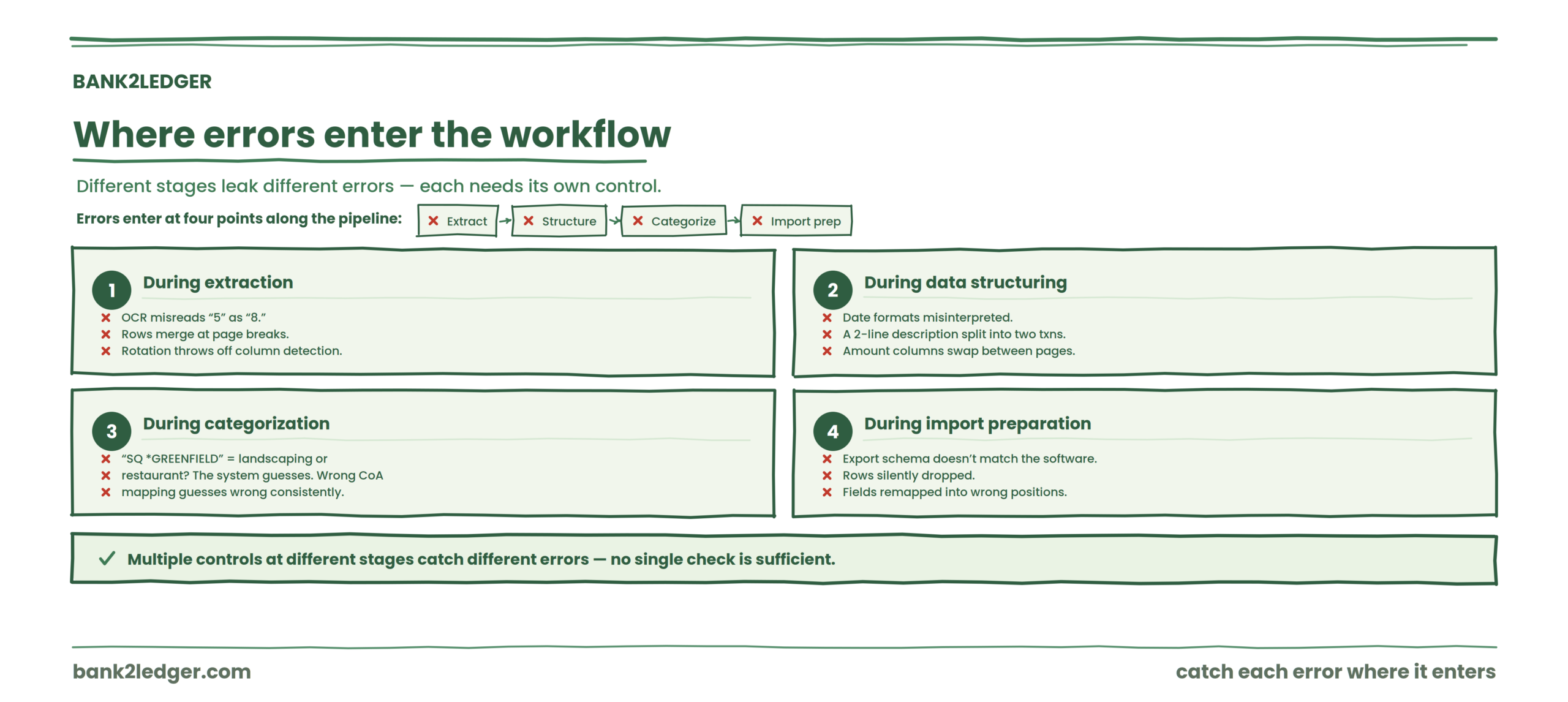
Where errors enter the workflow
During extraction
OCR misreads a “5” as an “8.” A table structure breaks across a page boundary and two transaction rows merge. A scanned statement is slightly rotated, throwing off column detection. These are common and usually fixable with better pre-processing, but they need to be caught.
During data structuring
Date formats get misinterpreted. A description that spans two lines in the PDF gets split into two separate transactions. Amount columns swap positions between pages on certain bank formats.
During categorization
A merchant name like “SQ *GREENFIELD” could be a landscaping expense or a restaurant. Without context, the system guesses. With the wrong chart of accounts mapping, it guesses wrong consistently.
During import preparation
The export file uses a column schema that doesn’t match what the accounting software expects. Rows get silently dropped. Fields get remapped into the wrong positions. The Clearstaq team documented this pattern, noting that import formatting issues and inconsistent chart of accounts mapping are persistent friction points across accounting workflows.
Multiple controls at different stages catch different types of errors. No single check is sufficient.
| Problem | The weird fix | Where it happens |
|---|---|---|
| Transaction rows split across lines | Re-run after de-skewing and tighten column detection | Extraction |
| Closing balance doesn’t reconcile | Isolate the broken page and verify row-level math | Verification |
| Dates appear shifted or malformed | Normalize all dates to one format before export | Structuring |
| Duplicate imports after reprocessing | Enable file fingerprinting before posting | Import preparation |
| Vendor names garbled but amounts correct | Manual review of low-confidence description fields only | Exception review |
| Import rejects rows silently | Re-map export headers to the software’s expected schema | Import preparation |
Where practitioners disagree
There’s an active debate about how much categorization should happen during bank statement processing versus inside the accounting software itself. Some firms want transactions fully categorized before import, arguing it speeds up month-end and reduces rework. Others prefer to import uncategorized transactions and handle classification within their accounting system, where they have full audit trail control and can apply journal-level logic.
I lean toward categorizing during processing for recurring, high-confidence transactions and leaving ambiguous ones uncategorized for the accountant to handle inside the software. But this depends heavily on the firm’s review workflow, and neither side has it completely wrong.
Where bank statement processing fits into pre-accounting
Bank statement processing is one component of the broader pre-accounting workflow that happens before accounting records are finalized. It sits alongside receipt processing, expense categorization, and data preparation. The processed output feeds into accounting software, but the accounting treatment, reconciliation, and posting happen downstream.
Processing prepares the data. It does not replace the accounting.
What happens after bank statement processing?
Processed, categorized transaction data enters the accounting system. From there, accounting records are created, bank reconciliation confirms the books match the bank, and entries get posted. To understand that full arc from raw data to closed books.
FAQ
What is bank statement processing?
Bank statement processing is the workflow of extracting transaction data from bank statements, structuring it into consistent records, verifying its accuracy through balance checks and integrity controls, categorizing transactions against a chart of accounts, reviewing exceptions, and preparing the output for import into accounting software. It covers the full preparation layer between a raw bank document and accounting-ready data.
Is bank statement processing the same as bank statement conversion?
No. Conversion typically refers to changing a file format, like turning a PDF into a CSV or Excel file. Processing includes conversion as one stage but extends through verification, categorization, exception review, and export preparation.
What happens after bank statement data is extracted?
The extracted data gets structured into consistent transaction records, then verified for mathematical accuracy and completeness. After verification, transactions can be categorized against the appropriate chart of accounts, flagged for exception review where confidence is low, and formatted for the destination accounting system.
Why is bank statement verification important?
Because extraction can produce errors even when the output looks complete. OCR misreads, merged rows from page breaks, and missing transactions all create data that appears correct at a glance but fails on the math. Opening and closing balance validation catches these problems before they enter the books.
Can bank statement processing be automated?
Extraction, structuring, balance checks, and rule-based categorization can be automated for routine transactions. Exception handling, ambiguous categorization decisions, and final review still require professional judgment. The realistic outcome is that automation handles the volume while accountants handle the uncertainty.
into accounting-ready data
Bank2Ledger supports the pre-accounting work between receiving raw bank statements and preparing transaction data for the accounting workflow, from extraction and balance verification through categorization and export preparation for QuickBooks, Xero, Tally, Sage, and Excel.